

A deep dive into microfrontends
what is a micro-frontend?
to really understand what a micro-frontend is, lets use this example: we're trying to build an ecommerce website with 2 primary features/components: a product-list and cart. so we have these 2 pages right, now lets assume we go with the classic approach where we have 1 single page application (SPA). We can build this using React or Vue or Angular or Svelte or any other of the many front-end frameworks but thats not really relevant to this post.
now, we may have 100s, 1000s of lines of code for these components and this would make it difficult for us to make changes and manage this project, and since all of the code is in 1 codebase this is known as a monolithic application. if we had to turn this into a micro-frontend (mfe) we could go the route of creating a separate application for the product-list page and a separate application for the cart page. now we have 2 applications and we can manage them separately.
but you may think, what if i click on the 'Add to Cart' button under the product-list page, how do we show this data in the cart? this is where we use APIs.
there will be no direct communication between the 2 apps, lets say we click on the 'Add to Cart' button, it triggers an API call to add this item to the Cart and when we go to the cart, we fetch the API that returns the items in the cart, and additionally we could have more APIs that allow u to manipulate the items in the cart.
why use mfes
one gigantic benefit we get is that these applications can now be thought of as 2 separate apps. since, there is no communication / dependency between the 2 applications, why not make them as mfes and have them separate so this way, we could assign this work into 2 teams and have them work independently. these teams could use whichever framework they're comfortable with and could take up their preferred development style. so if a team makes a change that breaks the project, the other team wont be affected by it, and this also makes the apps smaller, easy to understand, reuse and maintain.
application overview
now lets say we're building a simple framework agnostic app that has 2 components: product-list and cart. how do we show these components on the screen? more often than not, we end up creating another, a third mfe, known as a container. this container is responsible for and decides when & where to show the components and how to show them.
understanding build time integration
in the earlier section we spoke about how the container is responsible for deciding when to show the components and how to show them, then this statement would mean that the container has access to the mfe's source code right? here we're discussing some of the different ways of doing that.
this is where we introduce the term integration. now integration basically is stating how we're going to piece the different parts of our app together. before we talk about the different ways of integrating, some important points to note are:
- there is no single perfect solution to integration
- there are many solutions, each of them have their own pros and cons
- the best solution is to look and understand your requirements and then choose a solution
in general, there are 3 different categories of integration:
- build time integration
- runtime integration
- server integration
the scope of server integration is out of this article but this is a small paragraph of what this does. while sending down JS to load up the container, a server decides whether or not to include the product-list source code.
build time integration
were basically saying that our container has access to the product-list source code BEFORE its loaded to the browser. an example of build time integration: an engineering team develops an application, we deploy this as a package to npm and we import this package into our container, now when we load up the container, and load this package, this container has access to the product-list source code. now when we build the container project, the output dist (distribution) folder contains the source code for all the mfes in it.
pros and cons
(+) easy to setup and understand
(-) container has to be redeployed whenever there is a change in the package
(-) this tends to tightly couple the container and the packages
runtime integration
were saying the container gets loaded to the browser and THEN gets access to the source code of the 2 mfes. the difference between the 2 is minor but it makes a huge difference. an example of runtime integration: the engineering team builds the application, we deploy it on some URL like https://my-app.com/productList
when we navigate to my-app.com the container gets loaded, and then the container loads the source code of the product-list mfe. now when we navigate to my-app.com/cart, the container gets loaded, and then the container loads the source code of the cart mfe and executes it. this is also not the only way to implement this integration, but it is the most straightforward one.
pros and cons
(+) product-list and cart can be deployed separately and whenever they want
(+) the different versions of product-list can be deployed and their changes can we visible in the container with almost no change in the containers codebase
(-) more complex to setup
this article will focus more on rti and we're going to implement rti using webpack's module federation plugin
understanding webpack
here is some code to help you understand why we need webpack
import faker from "faker";

const el = document.querySelector("#dev-products");

let products = "";

for (let i = 0; i < 5; i++) {
  const name = faker.commerce.productName();
  products += `<div>${name}</div>`;
}

el.innerHTML = products;
now, if we run this code in the browser, we'll encounter errors and thats because the browser doesnt support these kind of import statements. hence the need and introduction to webpack! so for this we need to create a webpack config file and make changes to the package.json file to make it work. upon running the start script we observe that webpack is now building our file and has now given us a dist folder aka distribution.
typically in any production-level project, we have 3 webpack config files, webpack.common.js, webpack.dev.js, and webpack.prod.js. we can use the webpack config file to build our project in different ways. the common config file contains plugins and other properties that we'd need in both prod and dev, and the other 2 are for their respective environments. how do we determine which environment we're in?
well, webpack exposes a variable NODE_ENV that lets us know which env we're currently running in.
the scope of how to create a webpack dev and prod config file is out of the purview of this article, but let me know if youd like an article on that as well!
if you scroll and observe the source code, you'll find that this file contains code from faker as well as our code that we wrote to generate the product list. and another observation will say that all this code is in eval() functions. typically it isnt good practice to import too many packages into the browser right, which is why we use a bundler like webpack to bundle all the required files for us and spit out a file that we can deploy and see on our browser.
module federation plugin
the module federation plugin (MFP) allows us to link mfes and use them in containers. mfes like product-list and cart can be deployed separately and whenever they want. this is where we use the module federation plugin. productlist and cart are known as remotes and the container is known as the host. this module federation plugin has several benefits, as it allows us to share dependencies among apps so that the same package that maybe required by 2 projects isnt loaded twice.
integration process steps
1. Designate one app as the host and one app as the remote

   +-----------+                    +-----------+
   |   Host    |                    |  Remote   |
   +-----------+                    +-----------+
       |                                  |
       |                                  |
       +-------- Step 2 ----------------->

2. In the remote, decide which files/modules you want to make available to other projects

   +-----------+                    +-----------+
   |   Host    |                    |  Remote   |
   +-----------+                    +-----------+
       |                                  |
       |                                  |
       +-------- Step 3 ----------------->

3. Setup Module Federation plugin to expose those files

   +-----------+                    +-----------+
   |   Host    |                    |  Remote   |
   +-----------+                    +-----------+
       |                                  |
       |                                  |
       +-------- Step 4 ----------------->

4. In the host, decide which files/modules you want to get from the remote

   +-----------+                    +-----------+
   |   Host    |                    |  Remote   |
   +-----------+                    +-----------+
       |                                  |
       |                                  |
       +-------- Step 5 ----------------->

5. Setup Module Federation plugin to fetch those files

   +-----------+                    +-----------+
   |   Host    |                    |  Remote   |
   +-----------+                    +-----------+
       |                                  |
       |                                  |
       +-------- Step 6 ----------------->

6. In the host, refactor the entry point to load all the files asynchronously via a bootstrap file and `import()` function

   +-----------+                    +-----------+
   |   Host    |                    |  Remote   |
   +-----------+                    +-----------+
       |                                  |
       |                                  |
       +-------- Step 7 ----------------->

7. In the host, import and load whatever files you need from the remote

   +-----------+                    +-----------+
   |   Host    |                    |  Remote   |
   +-----------+                    +-----------+
       |                                  |
       |                                  |
       +---------------------------------->
lets break down what happens in the remote, but if you implement an mfe app, run it in dev and open your network console. youll see 3 requests being made to the port on which the remote is running. these 3 requests are for the following files
- remoteEntry.js
- src_index_js.js
- vendors_node ...
now that we've identified that we're fetching these 3 files, lets try and understand what these files are used for.
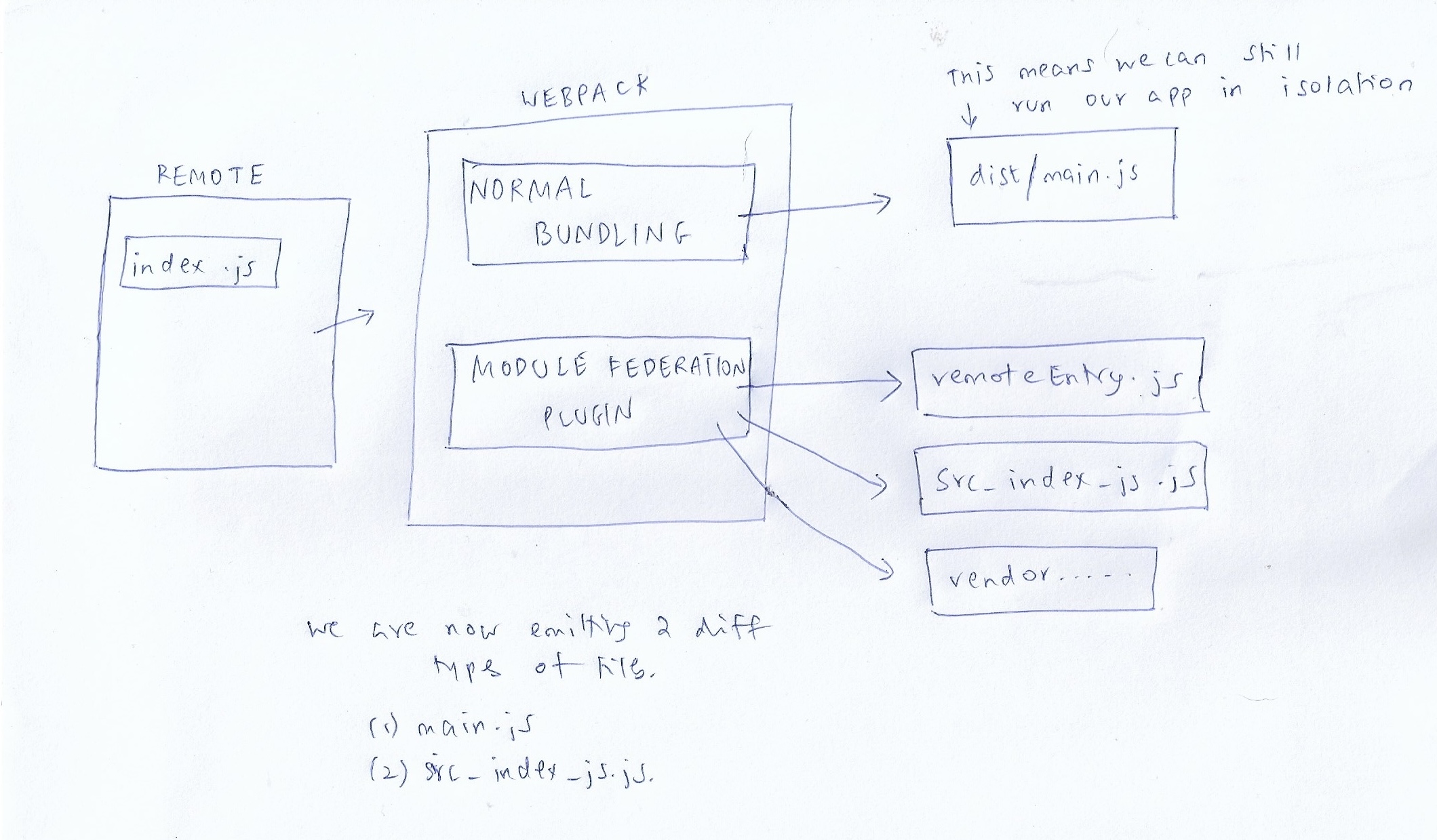
as mentioned in the diagram, we now are emitting two types of files, one main.js file that allows us to run our app in isolation and the other bundle of files, courtesy of the MFP.
the MFP emits 3 files as mentioned above but what do they do?
- remoteEntry.js - contains a list of files available from this remote and also has instructions on how to load them. its basically a manifest of files
- src_index_js.js - this is the safe-to-load in the browser version of the src/index.js file
- vendors_node_modules - contains the files that are not included in the src folder, but are required for the remote to run, for eg: faker.
now that we know what happens on the remote side of things, how does the host operate? what is its process flow?
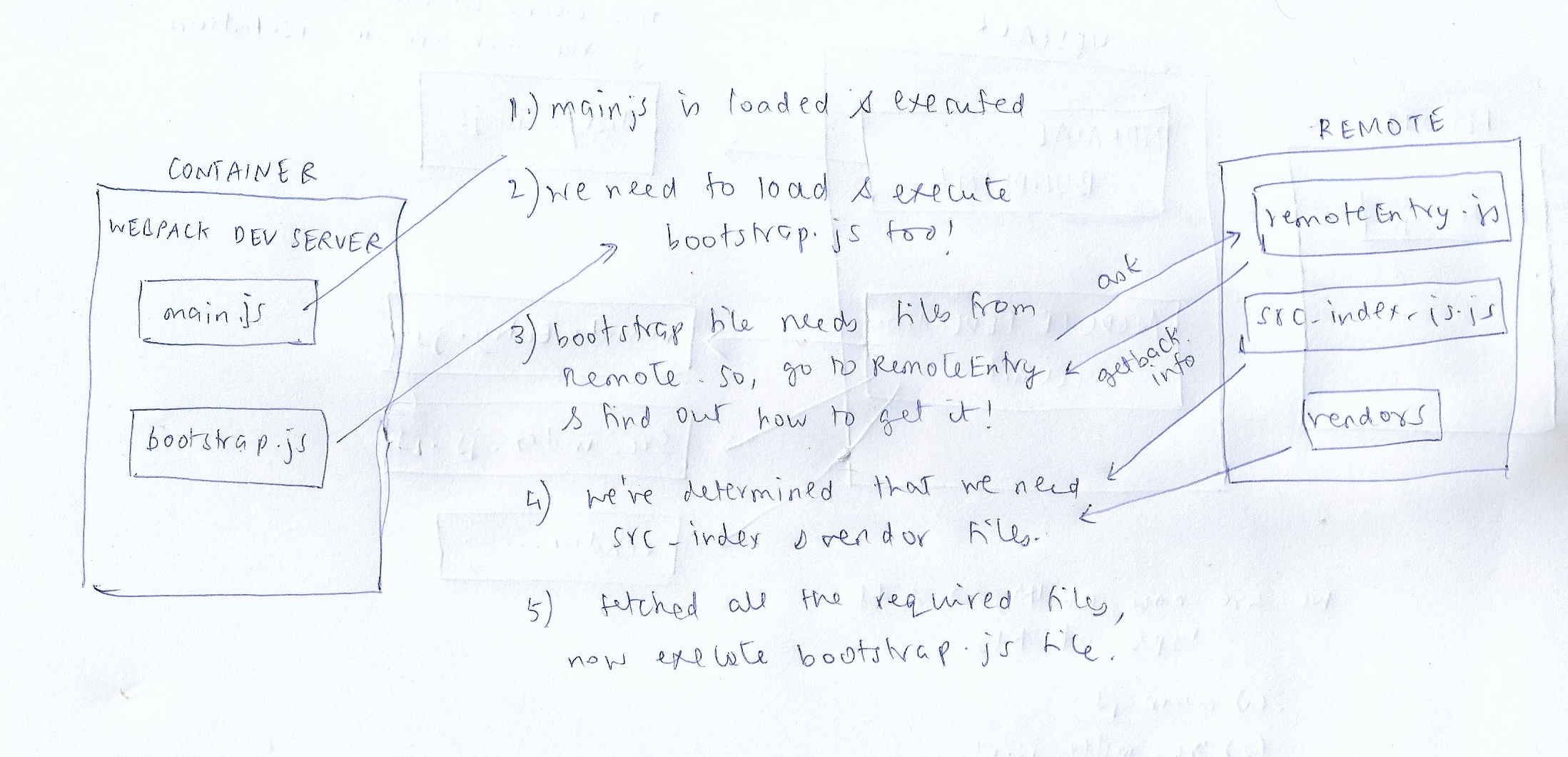
the rest of the course deals with deployments of mfes using S3, cloudfront and github actions. what we're doing is, when we make a change and commit the change to github, we run an action that builds this file in an ubuntu system, and using github secrets we also store our aws credentials and store this dist file into the S3 bucket in a path like this /container/latest this container's dist folder will have info on where the other mfes are hosted so this can boot up those projects and show them on the screen.
we then use cloudfront, a CDN to deploy this dist folder and we also set revalidation options when we setup the github actions. the code can be found here